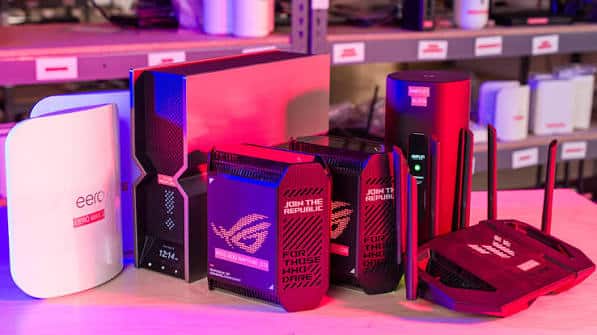
Your router is the traffic controller of your home network. Every packet of slot gacor data, every voice chat message, and every download passes through it. An outdated or poorly configured router can cause lag spikes, disconnections, and frustrating matches, even with a fast internet plan. Choosing the best gaming router for your needs can make online play smoother and more reliable. This guide explains the features that matter and helps you avoid paying for marketing hype.
Does a Router Really Affect Gaming?
A router cannot make your internet provider faster or move game servers closer. What it can do is manage traffic inside your home. A good router reduces congestion, prioritizes gaming data, maintains stable wireless signals, and handles many connected devices without slowing down. In busy households, these improvements can make a significant difference to ping stability and packet loss.
Key Features to Look For
1. Quality of Service (QoS)
QoS lets the router prioritize certain types of traffic. When someone streams video or downloads a large file, QoS ensures your game data still moves first. Some routers offer simple device-based priority, while others include adaptive or game-aware QoS that detects gaming traffic automatically. For households with multiple users, QoS is one of the most valuable features.
2. Modern Wi-Fi Standards
Newer Wi-Fi standards offer better speed, capacity, and efficiency, especially in homes with many devices. Look for a router supporting a current standard such as Wi-Fi 6 or newer. Newer standards also handle interference better and support more simultaneous connections. Remember that your devices must support the same standard to benefit fully.
3. Dual-Band or Tri-Band
Dual-band routers broadcast on 2.4 GHz and 5 GHz. Tri-band routers add an extra band, which can be dedicated to gaming devices or used for mesh system communication. Extra bands reduce congestion when many devices are active.
4. Enough Ethernet Ports
Wired connections remain the best choice for online gaming. Check how many Ethernet ports the router has. If you connect a PC, console, and streaming device by cable, you may need four or more ports. A network switch can add more ports if needed. Gigabit ports or faster are standard for modern routers.
5. Processor and Memory
Routers have processors and memory just like computers. More powerful hardware handles traffic management, QoS, and many connected devices more efficiently. Budget routers may struggle in homes with smart devices, streaming, and gaming happening simultaneously.
6. Coverage and Antenna Design
Consider your home’s size and layout. Thick walls, multiple floors, and long distances weaken Wi-Fi signals. Routers with strong antennas and beamforming technology focus signals toward connected devices, improving coverage.
7. Security and Firmware Updates
Choose a router from a manufacturer that provides regular firmware updates. Updates fix security vulnerabilities and improve performance. Features like automatic updates, WPA3 encryption, and guest networks improve safety.
8. Easy Management App
Many modern routers include mobile apps for setup, device monitoring, QoS configuration, and parental controls. A user-friendly interface makes optimization much easier.
Mesh Systems vs Single Routers
A single router works well in apartments and small homes. For larger homes or those with dead zones, a mesh system uses multiple units placed around the house to create seamless coverage. Mesh systems are excellent for consistent Wi-Fi, but for competitive gaming, connecting your slot depo 5k device by Ethernet to the main router or a mesh node with a wired backhaul is still ideal.
Gaming Router Marketing: What to Ignore
- Huge advertised speeds: Combined band speeds are theoretical and rarely matter for gaming data.
- Aggressive styling: Dramatic designs and lighting do not improve performance.
- Vague “gaming acceleration” claims: Look for specific features like QoS instead.
- Built-in VPN promises of lower ping: Results vary and are not guaranteed.
How to Set Up Your Router for Gaming
- Place the router centrally and elevated, away from obstructions.
- Connect gaming devices by Ethernet whenever possible.
- Enable QoS and prioritize gaming devices.
- Use 5 GHz or newer bands for wireless gaming devices.
- Update firmware regularly.
- Enable UPnP if your games need it for NAT type, understanding the security trade-offs.
- Reboot the router occasionally to clear temporary issues.
Do You Need a New Router?
Consider upgrading if your router is several years old, struggles with multiple devices, lacks QoS, drops connections frequently, or does not support modern Wi-Fi standards. If your problems appear even with a wired connection directly to the modem, the issue may lie with your internet provider rather than the router.
Frequently Asked Questions
Is a gaming router worth it?
For busy households, a router with strong QoS and modern hardware is often worth it. For single users with wired connections, a standard quality router may be enough.
Can a router lower ping?
It cannot reduce distance to servers, but it can reduce lag caused by home network congestion.
Should I use the router from my internet provider?
Provider routers can work, but many lack advanced QoS and powerful hardware.
Conclusion
The best gaming router is one that manages your home’s traffic intelligently, covers your space reliably, and stays secure with regular updates. Focus on QoS, modern Wi-Fi, enough Ethernet ports, and solid hardware rather than flashy marketing. Pair it with a wired connection, and you will enjoy smoother, more stable online gaming.